Shortcut keys Action
File Menu shortcuts
Ctrl+Alt+Shift+S Save the opened document for Web
Ctrl+Shift+P To change Page Setup for printing
Alt+Ctrl+P Print the opened document with preview
Alt+Shift+Ctrl+I To display the info of opened file
Ctrl+Q Used to exit from adobe Photoshop
Edit Menu shortcuts
Ctrl+Z To undo/redo the last changes
Alt+Ctrl+Z Go to one step backward
Shift+Ctrl+Z Go to one step forward
Ctrl+X or F2 Used to cut the selected area
Ctrl+C or F3 Used to copy the selected area
Ctrl+V or F4 Used to Paste the copied value
Image Menu shortcuts
Ctrl+L To adjust the color levels
Alt+Shift+Ctrl+L To adjust the auto Contrast
Ctrl+B Used to adjust the Color and Tone balance
Ctrl+U Used to adjust the Hue/Saturation
Ctrl+Alt+X Used to Extract the selected area
Ctrl+I Used to Invert
Layer Menu Shortcuts
Ctrl+N Used to insert new Layer
Ctrl+J Used to move Layer via copy
Ctrl+Shift+J Used to move Layer via cut
Ctrl+G To create the Group of layers
Shift+Ctrl+G To create the ungroup of layers
Ctrl+E Used to Merge the Layers
Ctrl+Shift+E Used to Merge Visible
Select Menu Shortcuts
Ctrl+A Used to select all
Ctrl+D Used to deselect all
Alt+Ctrl+A Used to select all layers
Shift+Ctrl+D Used to reselect
Filter Menu Shortcuts
Alt+Ctrl+X Used to extract the selected image
Shift+Ctrl+X Used to Liquify the selected image
Alt+Shift+Ctrl+X To create the Pattern Preview
Ctrl+F Used to view the last Filter
Filter Menu Shortcuts
Ctrl++ or Ctrl+= Used to apply Zoom in
Ctrl+- Used to apply Zoom out
Ctrl+0 Used to view as Fit on screen
Ctrl+R Used to display the Rulers
F9 Used to display the Actions panel
F5 Used to display the Brushes panel
F6 Used to display the Color panel
Adobe Photoshop Keyboard Shortcuts
How to enjoy Windows Media Player using shortcuts keys?
In Windows Media Player, you can use the combination of different keyboard keys to accomplish routine task. By using these keys, you can increase the working speed in media player, otherwise require a conventional mouse to select menus and buttons options. Basically keyboard shortcuts keys help you to save time and you can perform any tasks without leaving the keyboard keys.
Shortcut keys Action
ALT+1 Adjust zoom to 50 percent
ALT+2 Adjust zoom to 100 percent
ALT+3 Adjust zoom to 200 percent
ALT+ENTER Display the video in full mode
ALT+F Go to media player File Menu
ALT+T Go to media player Tools Menu
ALT+V Go to media player View Menu
ALT+P Go to media player Play Menu
ALT+F4 Use to close media player
CTRL+1 Display media player in full mode
CTRL+2 Display media player in skin mode
CTRL+B Use to play the previous item in media player
CTRL+F Use to play the next item in media player
CTRL+E Use to Eject CD or DVD from CD or DVD drive
CTRL+P Use to Play or Pause the item in media player
CTRL+T Use to Repeat the items in media player
CTRL+SHIFT+B Use to Rewind a file in media player
CTRL+SHIFT+F Use to Fast Forward a file in media player
CTRL+SHIFT+S Use to play items slower than a normal speed
CTRL+SHIFT+ G Use to play items faster than a normal speed
CTRL+SHIFT+ N Use to play items at normal speed in media player
F8 Use to mute the volume in media player
F9 Use to decrease the volume in media player
F10 Use to increase the volume in media player
ENTER or SPACEBAR Use to play an item
Enjoy...
How To Format USB Drive With NTFS File System
The advantage of NTFS file system is that it is fast and it has got security options. But the problem is that usually the USB drives are small enough that NTFS is not recommended for them. But nowadays the USB drives are coming with larger sizes. So it’s better to format a drive as NTFS than the traditional FAT32 of FAT file systems which have no security at all. Having NTFS file system on the USB drive has an advantage that one can configure the security of the drive so that it is write-able only on one system and becomes read only on all other systems. So you can read and write on your own system and transfer the files elsewhere without the fear of the virus infections etc as the drive becomes read-only in all other systems.
Usually when we want to format the USB drive, only FAT and FAT32 file systems are available for the format. Here is the trick by which you can format the drive with NTFS file system.
Plug in your USB drive
Go to Start –> Run –> devmgmt.msc
Device manager will open up. Expand Disk Drives. Right Click your USB drive and select Properties
Go to policies tab and select Optimize for performance
Click OK
Now go to My Computer, right click the USB drive and select Format
In the File system selection combo, the option of NTFS will be available now
Select NTFS and click Start.
Your USB drive will be formatted with NTFS file system. Now you can configure it’s security by right clicking the drive and going to properties –> security tab.


How to recover data from scratched CDs/DVDs
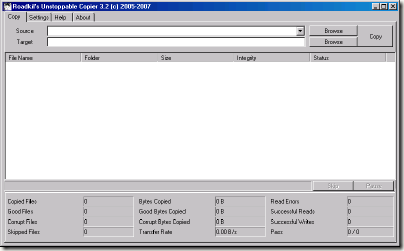
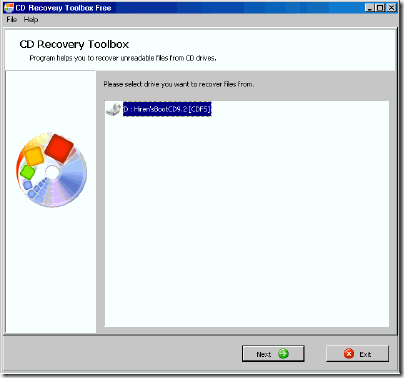
Scratched a DVD with some important files on it recently? One of my favorite TV shows ever is Lost. I find it to be interesting, but unfortunately, it also sucks up a lot of my hard drive space, with each episode at over 350mbs. I lose quite a bit of hard drive space due to this show, and that’s just that one show, not including other shows like Heroes or House. So, just like every other guy in this world, I burn the shows onto DVDs, as it’s a cheap and easily accessible way to store data. But the only problem with this is the fact that CDs or DVDs aren’t invulnerable to all types of damage, and in fact, even a small finger print or scratch can make a DVD/CD player not able to read the disk. The main reason why the players can’t read the disk is because the damaged part of the disk doesn’t contain any data. If you try to copy-and-paste the file on the damaged disk onto a computer, you usually get an error saying the file is corrupted, or damaged. So, after losing many disks, and spending many hours of re-burning, and re-burning, I finally put my foot down and looked for some methods to recover data from damaged CDs or DVDs. I found some totally weird methods involving toothpaste, banana skins, even candle wax, but I also found some really handy programs, which I thought I’d share with you all today. The way these programs work is by copying out the entire file, just skipping out on the damaged part, so it allows you to salvage the majority of the file. Method 1: Roadkil’s Unstoppable Copier
Roadkil’s Unstoppable Cleaner recovers files from any kind of damaged disk. It allows you to copy files from disks that give ‘corruption‘ errors, and those that are scratched. The program attempts to recover all the parts of the file that are still readable, and ignore the damaged parts. The program is tiny, and it needs no installation, so you can just jump straight in. Method 2: CD Recovery Toolbox
CD Recovery Toolbox supports a vast range of disks - CD, DVD, HD DVD, Blu Ray and so on. Basically, it recovers data off disks with physical damage (chipping, scratches) or some some sort of incorrect recording. So there you have it, a few good ways of recovering data that seemed forever lost on a damaged disk. Just remember that you’ll have a part of you file that will be missing, the part that was originally damaged, as these programs don’t repair the disk, but instead recover all other parts of the file. So, for example, if you’re watching a film, 2 minutes of the film might be skipped, due to the fact that the part skipped was damaged
Disable/Enable USB Drive
USB drives are mostly used for transferring of data from one computer to other. However, it is possible to disable or enable (incase of a virus has disabled it) the USB drive using some registry tweaks and no third party software. The whole procedure is divided into two steps both of which should be completed. Note: Make sure you know how to safely edit the registry.
To disable the USB drive, first:
Open Registry Editor. (Start->Run->”regedit”)
Navigate to HKLM\System\CurrentControlSet\Services\USBstor
Change the value of the dword “Start” from 3 to 4. If the dword “Start” doesn’t exist, create it.
Exit Registry Editor

Second thing to do is to change the permissions on the USBSTOR key. You need to DENY full control on the “system” group. You can do that by right clicking on the USBSTOR, clicking permission and removing everyone, except yourself.
In case the USB drives are disabled, you just have to open registry editor and revert the settings provided above.
Alternatively you can also download the the freeware provided below courtesy of Intelliadmin.
[Download USB Disabler
How To Uninstall An Application That Has No Uninstall Program ?
*If you want to uninstall an application that has no uninstall program and it is not listed in the Add/Remove applet of Control Panel (or that uninstall doesn't work), then just delete the directory/files.
Make a backup of the registry
Shutdown the application, if it is running (If WinNT+ check also for services)
Search the registry for any references to the directory where the application resides, and remove them
Search the registry for any references to the name of the application, and remove them
Start Regedit and drill down to :
[HKEY_CURRENT_USER \Software \]
[HKEY_LOCAL_MACHINE \Software \]
[HKEY_LOCAL_MACHINE \Software \Microsoft \Windows \CurrentVersion \SharedDLLs]Rename the directory in which the application was installed in the first place
Reboot and if everything goes well, then delete the renamed directory
Use Explorer to to remove the entries from the Start Menu in either
C:\Documents and Folders\All Users\Start Menu\Programs\ and/or
C:\Documents and Folders\(your username)\Start Menu\Programs\
If there is an entry in the Add/Remove list, start regedit go to:
HKEY_LOCAL_MACHINE\SOFTWARE\Microsoft\Windows\CurrentVersion\Uninstall
Locate the entry and delete it. If the app has a service, edit:
HKEY_LOCAL_MACHINE\System\CurrentControlSet\Services
and scroll down till you locate it. Then delete it. If this app starts automatically and there is no entry in the StartUp folder(s), then use Regedt32 to edit:
HKEY_CURRENT_USER\Software\Microsoft\WindowsNT\CurrentVersion\Windows
Customize “Send to” to send files anywhere on right click
If you want to move same time type of files again and again to the same place then this trick will be helpful to you. Rather than copy and pasting the file by browsing directories or keeping a shortcut pointing to that location on your Desktop, there’s an even easier (and more flexible) way to quickly move files to a favorite place. Yes, this can done by customizing “Send to” right click windows menu.
The trick is short and simple, it goes here:
Select the Folder where you want to send to files generally and create short to it there itself.
Go to directory “C:\Documents and Settings\Rohit\SendTo” (replace Rohit with username of your PC.
Copy that shortcut created in Step 1 to this directory and you are done!
Now you will be able to see the name of specified folder in Right click “Send to” menu. Here’s the preview- I have specified “D:\Rock on” to be shown in send to menu.
Note : Destination of SendTo folder may vary in case you have two Operating systems or installed Windows on other partition except C drive.
Such Directories are hidden so, you will need to select “Show Hidden Files and Flders” from Folder options.

Expert MySQL (Expert
# Publisher: Apress (January 22, 2007)
# Language: English
# ISBN-10: 1590597419
# ISBN-13: 978-1590597415
Book Description
Since the enormous number of new features made available with MySQL release 5.0, MySQL has been gaining steam as a viable alternative to database behemoths like Oracle and IBM DB2. MySQL users now have the ability to extend MySQL with new SQL commands, optimize query execution, and embed MySQL within low-resource environments like embedded devices and kiosks.
Expert MySQL, by Dr. Charles A. Bell, is the first book to examine these opportunities in detail, showing you how to wield maximum control over this powerful open source database. You'll learn how to create your own custom storage handlers, ensuring maximum flexibility and speed within your specialized applications. You'll also gain valuable insight into MySQL's architecture and learn how to tweak its behavior through custom changes to the source code.
About the Author
Dr. Charles A. Bell conducts research in emerging technologies. He is an adjunct professor at Virginia Commonwealth University where he teaches graduate-level computer science courses and recently joined MySQL AB as a senior software developer. He lives in a small town in rural Virginia with his loving wife. He received his Doctor of Philosophy in Engineering from Virginia Commonwealth University in 2005. His research interests include database systems, versioning systems, semantic web, and agile software development.
Download

Oracle8i: The Complete Reference
As documentation of a product that incorporates a highly reliable database server, a set of utilities, and a development environment, Oracle8i: The Complete Reference essentially sets out to do the impossible. The great thing is that it succeeds. For all but the most obscure and situation-specific Oracle8i questions that database administrators (DBAs) and developers might have, this book is almost certain to have the information they need. It explains all the essentials with a straightforward combination of prose, conceptual diagrams, and code listings, so even new Oracle DBAs will derive a lot of use from the authors' work. The key concepts--including relational database design, and queries that use SQL and PL/SQL--get lots of attention. Many details seem to come up at least twice, so readers get a couple of angles on a given subject.
This book isn't a rehash of earlier editions, any more than Oracle8i itself is a rehash of its predecessors. The authors pay special attention to the new aspects of the Oracle environment, particularly to those having to do with stored procedures and Oracle's deepening relationship with the Java programming language. Don't expect to learn Java from the ground up in these pages, but look forward to a comprehensive statement of how Java code (and SQLJ queries) can make your Oracle applications more capable and platform-independent. Every Oracle DBA (and probably every Oracle developer, too) should keep this volume on hand; it's a definitive reference. Although the book isn't designed specifically as a study aid, you certainly could use it as a guide while preparing for Oracle certification. --David Wall
Topics covered: Administration of Oracle databases, and development of applications based upon them. Administrators of Oracle7.x, 8.0.x, and 8i systems will appreciate the sections on performance tuning, optimization, backup, recovery, and general relational database design. Readers with more of a development bent will like the coverage of SQL, PL/SQL, stored procedures, and Oracle's Java features. Sample code appears on a companion CD-ROM, as well as in print.
Product Description
Announcing the 10th Anniversary Edition of the best-selling Oracle book of all time--Oracle8i: The Complete Reference! Written by Oracle experts and complete with a fully searchable book and reusable code on CD-ROM, this is the most definitive resource available on Oracle8i. It's a must-have for every Oracle professional.
Download

Oracle Books All In One - *2007* Bestsellers
Prentice Oracle PL SQL By Example 3rd Edition LiB
Download
Prentice Programming Oracle Triggers And Stored Procedures 3rd Edition eBook LiB
Download
OReilly Oracle PL SQL for DBAs Oct
Download
eBook McGraw Hill Osborne Oracle Database 10g SQL
Download
Oreilly Oracle Essentials Oracle Database 10g 3rd Edition eBook LiB
Download
McGrawHill Oracle Database 10g New Features
Download
McGraw Hill Oracle Database 10g A Beginner’s Guide
Download
Prentice Oracle DBA Guide To Data Warehousing And Star Schemas eBook LiB
Download
Que Oracle 9i Fundamentals I Exam Cram 2 Nov eBook LiB
Download
Prentice Hall PTR Oracle DBA Scripting Quick Reference Apr eBook DDU
Download
Prentice Oracle DBA SQL Quick Reference eBook LiB
Download
Sybex Oracle9i DBA JumpStart eBook LiB
Download
McGraw Hill Oracle Database 10g High Availablity with RAC Flashback 26 Data Guard
Download
Apress Expert Oracle9i Database Administration eBook LiB
Download
Digital Press Oracle High Performance Tuning for 9i and 10g
Download
Digital Press Oracle High Performance Tuning for 9i and 10g eBook DDU
Download
Addison Wesley Guerrilla Oracle eBook LiB
Download
Sams Oracle Database 10g Insider Solutions
Download